Web app
React + TypeScript, Vite, Tailwind CSS and Recharts. Calculations and Excel, PDF and PowerPoint exports run in your browser.
A structured, rules-based environment to construct, stress-test, and compare ETF portfolios — with deep risk analysis, Monte Carlo simulation, and full transparency into every allocation decision.
For educational and illustration purposes only. Not investment advice.
Built for professionals and serious investors who demand transparency and rigour.
Rapidly prototype allocation structures, validate inputs against coherence checks, and export institutional-grade PDF reports and PowerPoint presentations.
Build client-specific ETF portfolios with full rationale documentation. Compare scenarios side by side and stress-test against six historical events, from the Dot-com Crash to the 2022 Rates Shock.
Move beyond generic model portfolios. Define your own constraints, understand the mechanics of your allocation, and make decisions backed by risk metrics — not gut feel.
A short visual introduction to the Investment Decision Lab.
Three steps from blank canvas to institutional-grade portfolio.
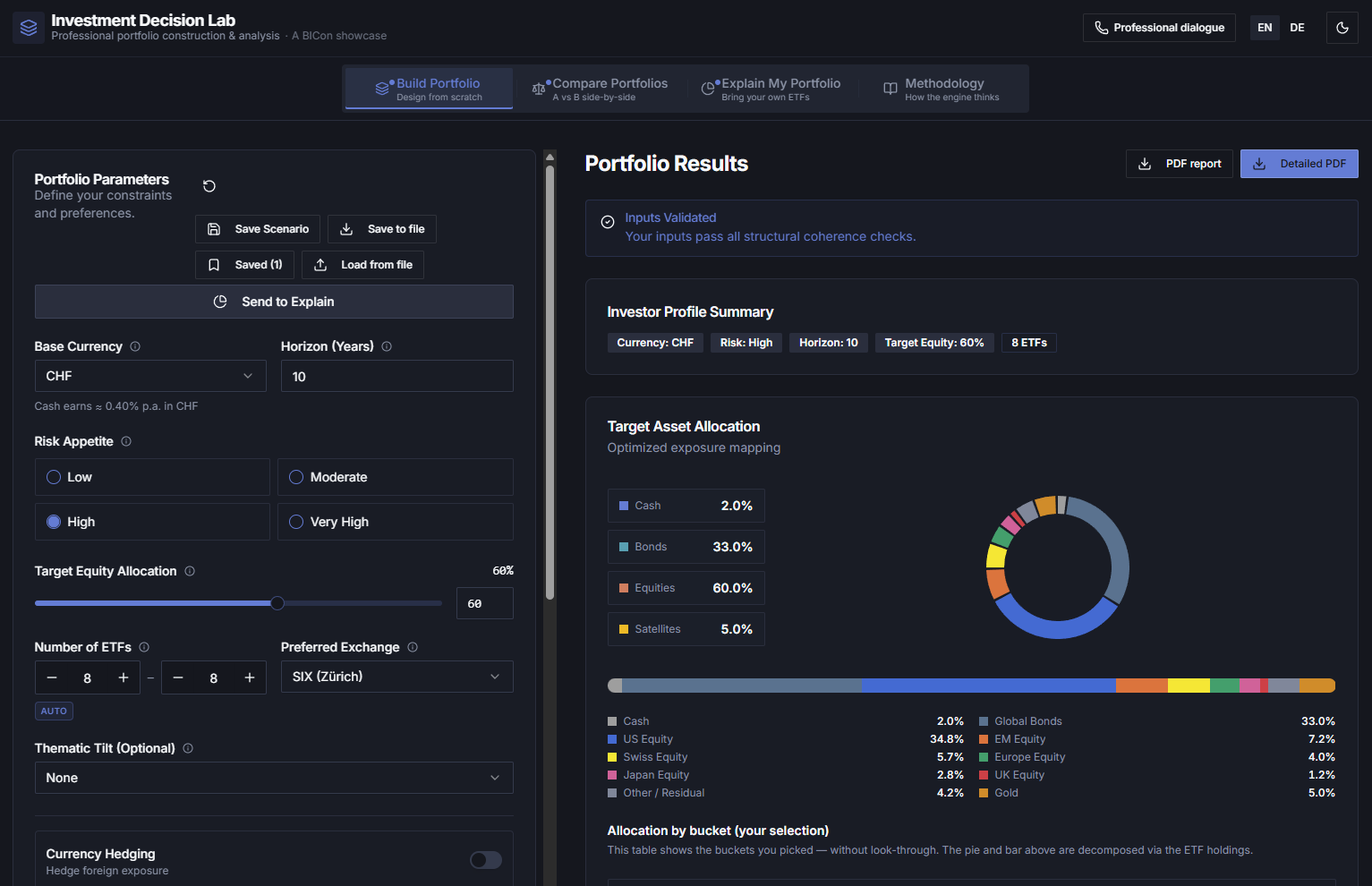
Set your constraints — base currency, investment horizon, risk appetite, equity target, number of ETFs, exchange preference, thematic tilt, and hedging.
Receive a fully structured allocation with ETF-level detail, asset class weights, geographic breakdown, and a plain-language rationale for every decision.
Stress-test against historical crises, run Monte Carlo simulations, compare portfolios side by side, and export a professional PDF report or PowerPoint presentation.
Covering the full decision cycle from construction to explanation.
Rules-based allocation, starting from the global market portfolio through to ETF implementation with look-through to the underlying holdings. Explore backtesting and Monte Carlo simulation, compare historical and forecast returns and volatilities, and analyse concentration, overlaps, tail risk, stress scenarios, correlation assumptions and home bias.
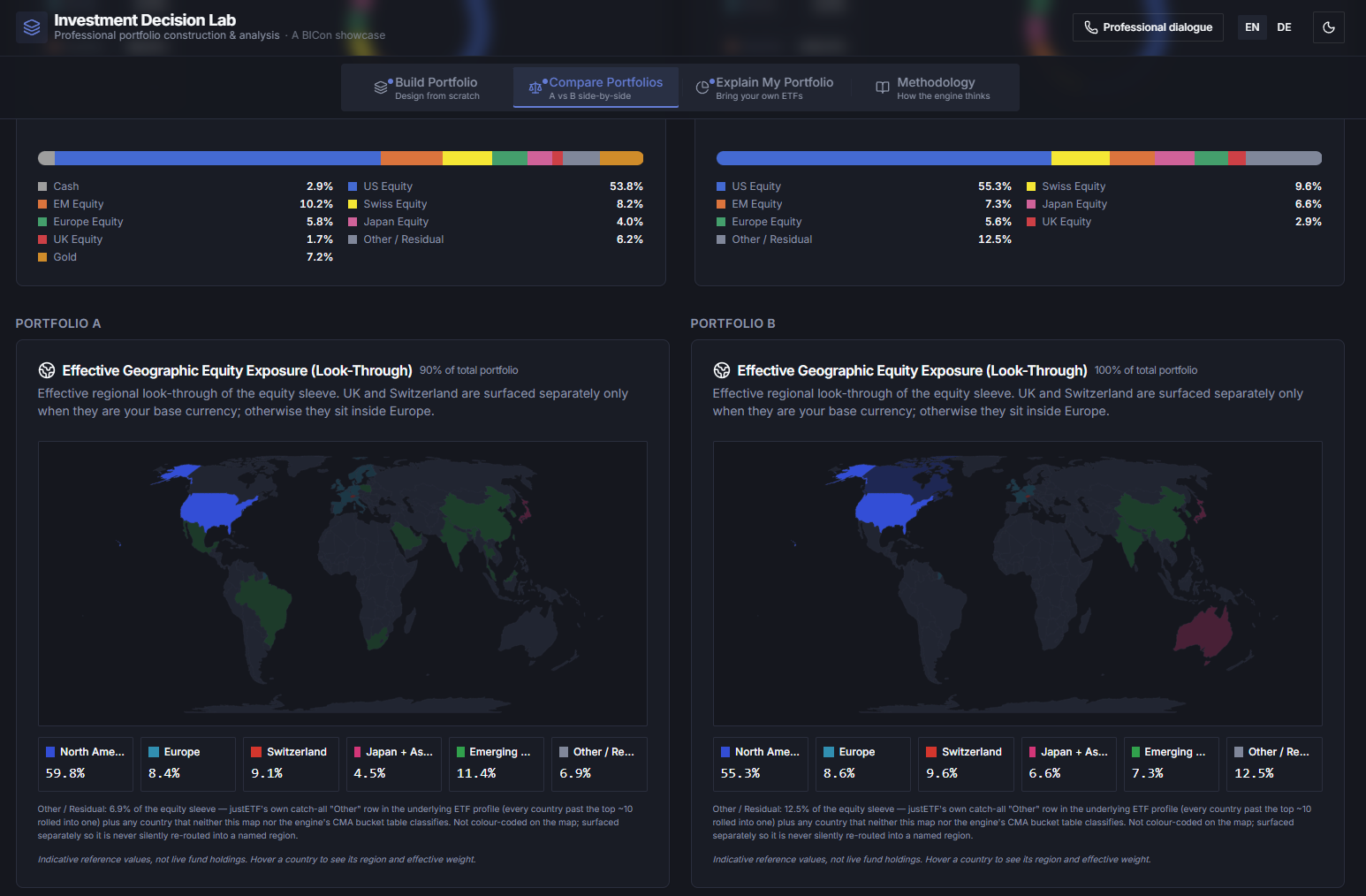
Place two portfolios side by side with the same full set of analytics as the Build Portfolio module — from look-through to the underlying holdings to backtesting, Monte Carlo simulation, historical and forecast returns and volatilities, concentration and overlap analyses, tail risk, stress scenarios, correlation assumptions and home bias.
Enter any ETF or combination of ETFs — your own selection, not a generated portfolio — and explore it with the same full set of analytics as the Build Portfolio module: look-through to the underlying holdings, backtesting, Monte Carlo simulation, historical and forecast returns and volatilities, concentration and overlap analyses, tail risk, stress scenarios, correlation assumptions and home bias. A plain-language explanation makes the overall structure transparent.
Try itDocumented, deterministic portfolio calculations use return and volatility assumptions that can be forecast, custom or historical, with correlations from the forecast set. Current prices, NAVs and yields are not model inputs; protected delayed-price views remain separate.
The Explain My Portfolio module lets you enter any ETF — by ticker or ISIN — and receive the same institutional-grade look-through analysis as a generated portfolio. Understand exactly what you hold, what risks you carry, and how coherent the structure is.
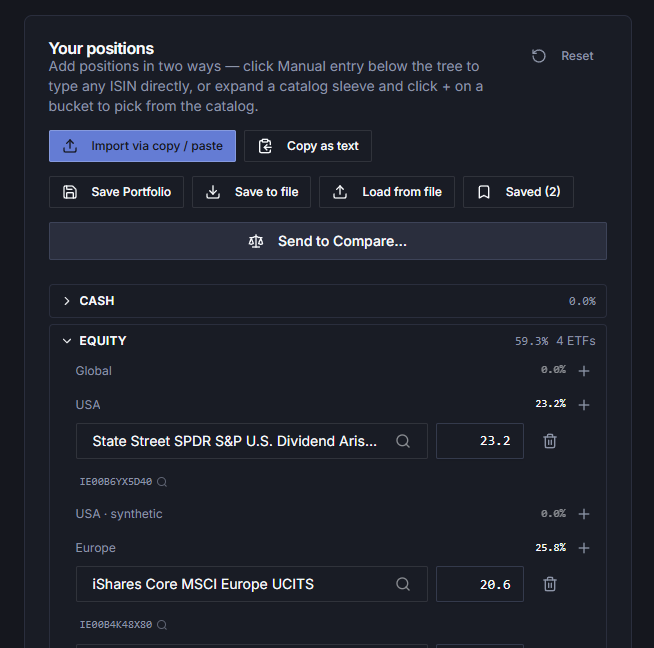
Every portfolio generated includes a full breakdown across asset classes, regions, and instruments — with the rationale to back it up. Exportable as genuine PowerPoint or PDF for client presentations or investment committee review.
Every portfolio follows a consistent, documented set of construction rules — not discretionary judgement.
Optimised for Swiss, EU, and UK investors — with home-bias multipliers and withholding-tax drag per base currency.
Portfolios are stress-tested against six historical crises and market shocks before you commit to a structure.
Inputs are checked for structural coherence before any portfolio is generated. No silent errors.
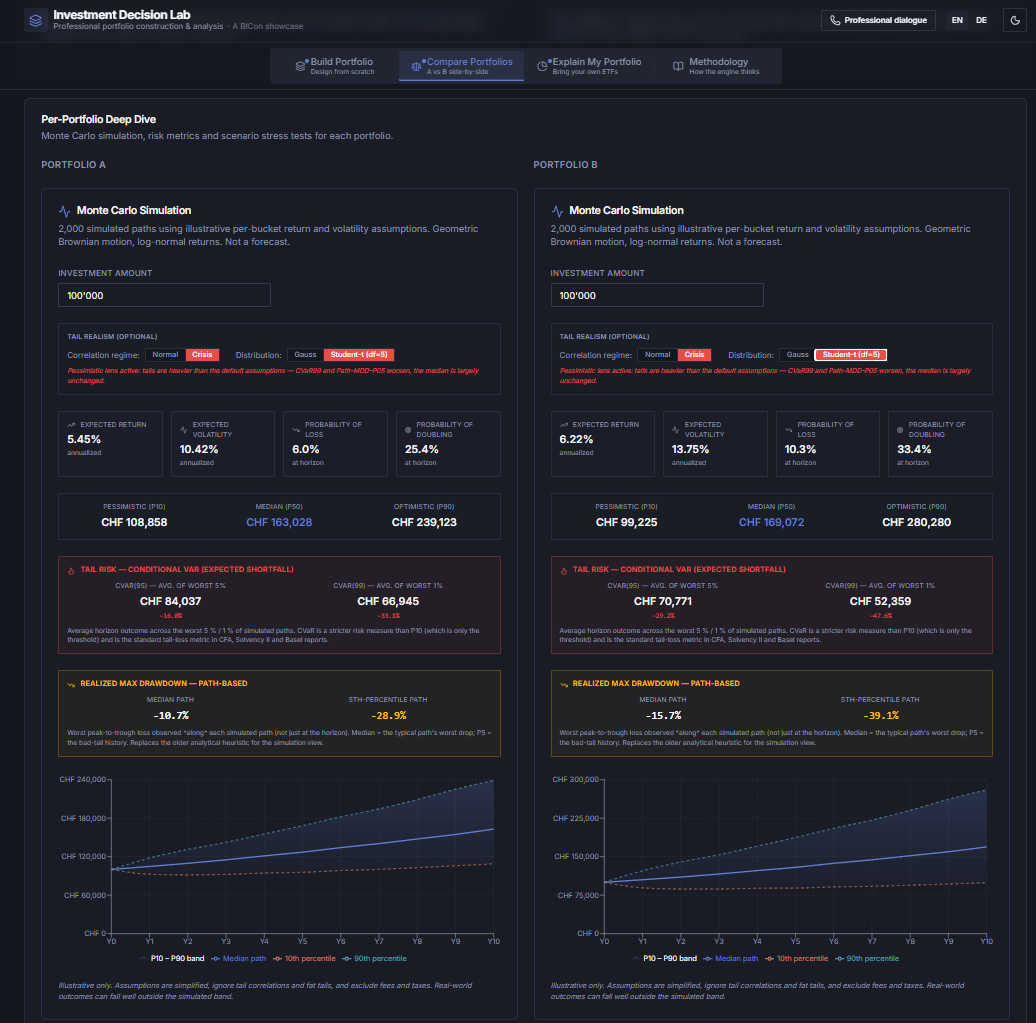
Project portfolio outcomes across thousands of simulated paths. Visualise return distributions, drawdown risk, and probability of meeting your investment goals.
Allocations are decomposed through ETF holdings to the underlying asset class and geographic exposure — applied across all risk calculations, stress tests, and portfolio breakdowns.
Tailor the Investment Decision Lab to your investment philosophy – from capital market assumptions, risk-free rates and inflation to asset allocation rules, regional tilts, ETF selection and concentration limits. Define your own global equity market benchmark and shape how portfolios are constructed, analysed and explained.
Your house view. Your rules. Your investment decisions.
Try it in MethodologyInputs you can edit live in this view — values are stored locally and override the defaults everywhere in the app.
Daily adjusted-close prices and FX histories provide a clear record of how a selected ETF portfolio performed across its shared available history.
Available in the Lab — securely protected by passphrase
Price and FX histories are sourced from EODHD. The current licence does not permit publishing or redistributing data derived from those histories to third parties.
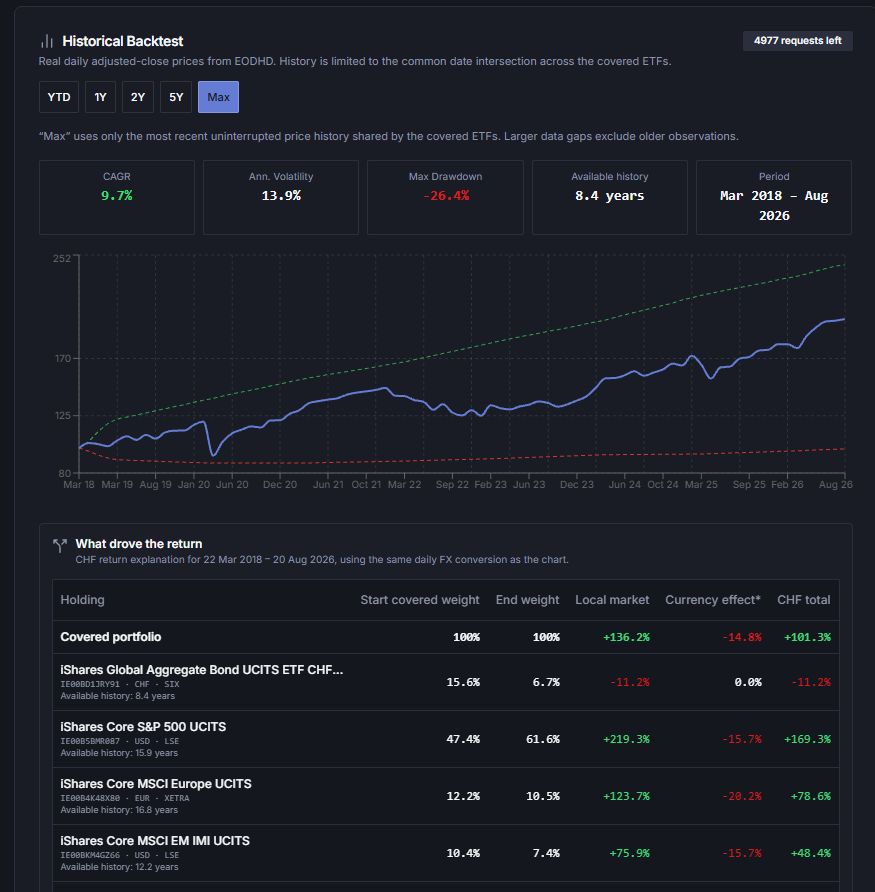
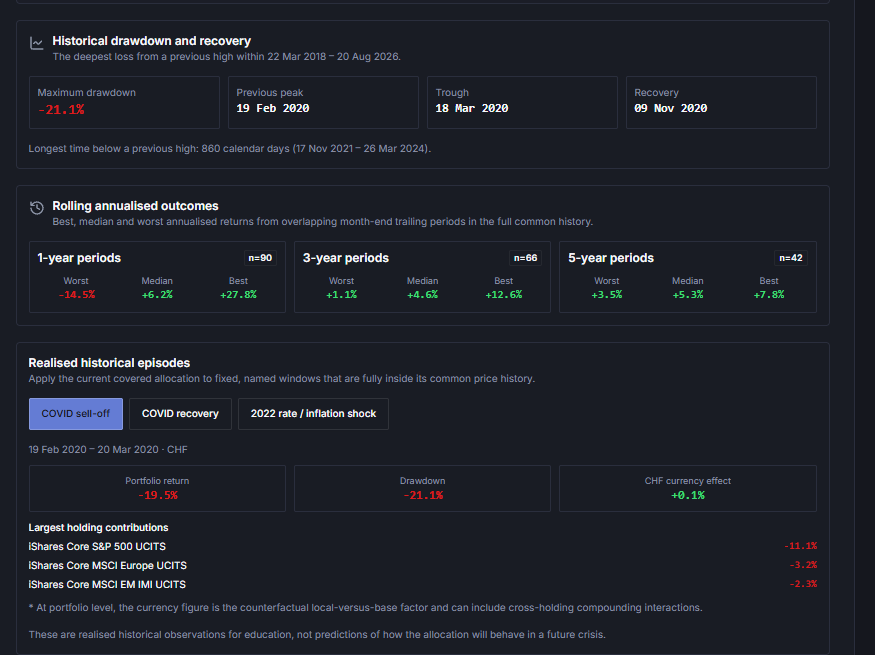
The past does not necessarily predict the future, and forecasts are not facts either. Expected returns and volatilities are fully adjustable: our market outlook need not be yours.
Three perspectives
Forward-looking assumptions
Long-term expected returns and volatilities.
Your own expectations
Fully customisable assumptions reflecting your market outlook.
Historical performance
Annualised returns and volatilities from up to 10 years of ETF prices.
Switch between them and compare the impact on portfolio construction, including Sharpe-ratio optimisation and thematic tilts, on Monte Carlo future outcomes, and on risk metrics.
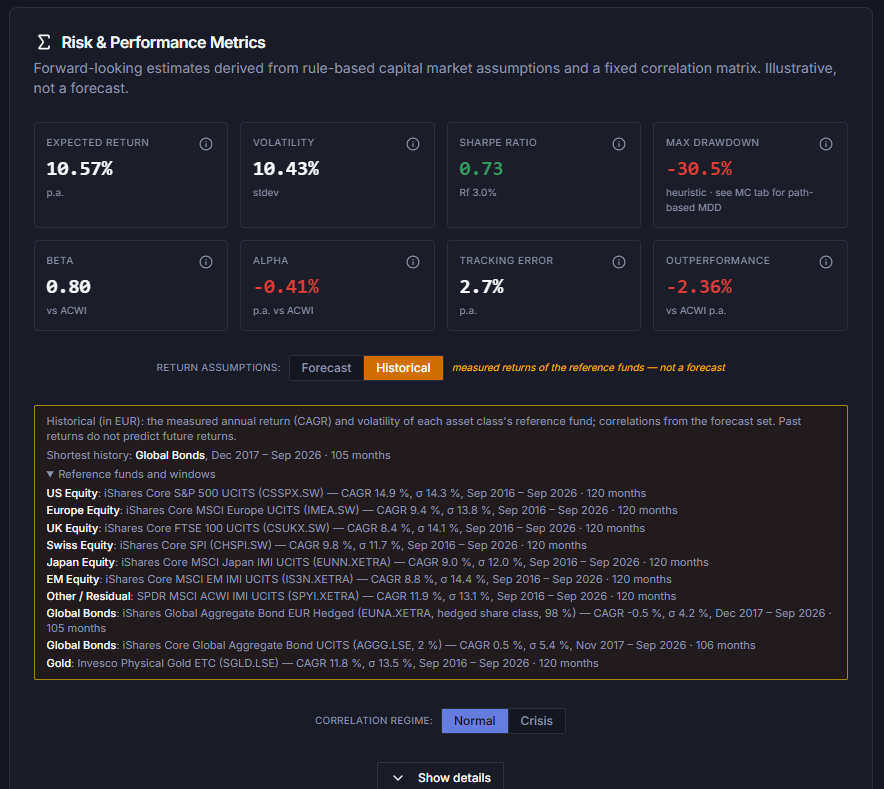
Screenshot: historical figures are measured returns and volatilities of reference funds, not forecasts. Correlations remain from the forecast set.
Core portfolio calculations are rule-based, deterministic and run in your browser. Return and volatility assumptions may be forecast, custom or historical; correlations remain from the forecast set. Current prices, NAVs and yields are not model inputs. Optional market-data and backtest views, unlocked with an access code, show delayed prices on request for information only. The app also uses a catalog database and backend functions. Model assumptions and formulas are documented.
Deterministic finance meets AI intelligence.
The Lab generates a fully deterministic, rule-based portfolio proposal. A one-click Copy AI Prompt gives you a CFA-level briefing to paste into any AI — ChatGPT, Claude, Gemini, or any other. The AI responds with its own recommendation, including a plain-text import block you paste straight back into the Lab's Explain module. The Compare tab shows both side-by-side across every key metric.
Create a rule-based portfolio tailored to your risk profile, horizon, currency, and preferences.
One click creates a CFA-level prompt for any AI model — ChatGPT, Claude, Gemini, or any other.
AI returns a portfolio proposal with a plain-text import block ready to paste.
Paste the block. The Lab automatically maps ETFs, allocations, and data.
Both portfolios across all key metrics and scenarios — expected return, volatility, Sharpe, Monte Carlo, cost.
Two independent perspectives. Zero manual data entry. Better decisions.
The Investment Decision Lab includes an MCP server for constructing portfolios from scratch, analysing portfolios from Build or Explain and making what-if changes in a natural-language conversation. Specify a base currency, risk profile and investment horizon, or build a portfolio around a target return.
An invitation code is required. Request access at info@bicon.li.
Works in Claude and ChatGPT. In ChatGPT, a paid subscription with Developer Mode is required.
Connect Claude or ChatGPT to the Investment Decision Lab and work with your portfolio in plain language. Every figure comes from the Lab’s own engine, not from the AI.
Start from scratch in plain language: “Build a portfolio in CHF, High risk profile, 15 years.” You can also build around a target return.
Return, risk, Sharpe ratio and costs at a glance.
Review the assumptions behind a proposal.
The range of outcomes over your horizon and the probability of a loss.
The monthly amount, start amount or years needed to reach a target.
The lowest equity share that reaches a return you set.
How the portfolio would have done in past crises, from the 2008 financial crisis to the 2022 rate shock.
Describe a scenario, such as tariffs plus an oil shock, and see its impact.
Today’s rates and inflation next to the model’s assumptions.
Change the risk profile, the horizon or a fund, and compare the results.
Compare two portfolios side by side and get a memo on moving from your depot to a target.
Turn a PDF, picture or pasted statement into a portfolio.
A client report, a PowerPoint deck in the Lab’s design, a one-pager, or an Excel order list.
Each result opens back in the app with one link.
The AI can display and critically review capital market assumptions, but cannot change them in chat. To change assumptions, update them in the app's Methodology and then pass the updated portfolio to the assistant again.
One integrated chat. No more copying and pasting between tools.
Analyse portfolios, review assumptions and interpret results in one natural-language conversation – supported by the Lab's quantitative models rather than generic AI-generated estimates.
The architecture also enables integration with external systems, including market data providers and brokerage platforms, through additional MCP servers. This creates the potential for seamless workflows from market data retrieval and portfolio analysis to optimisation, order preparation and approval.
Two examples of analysis and preparation in a single AI conversation.
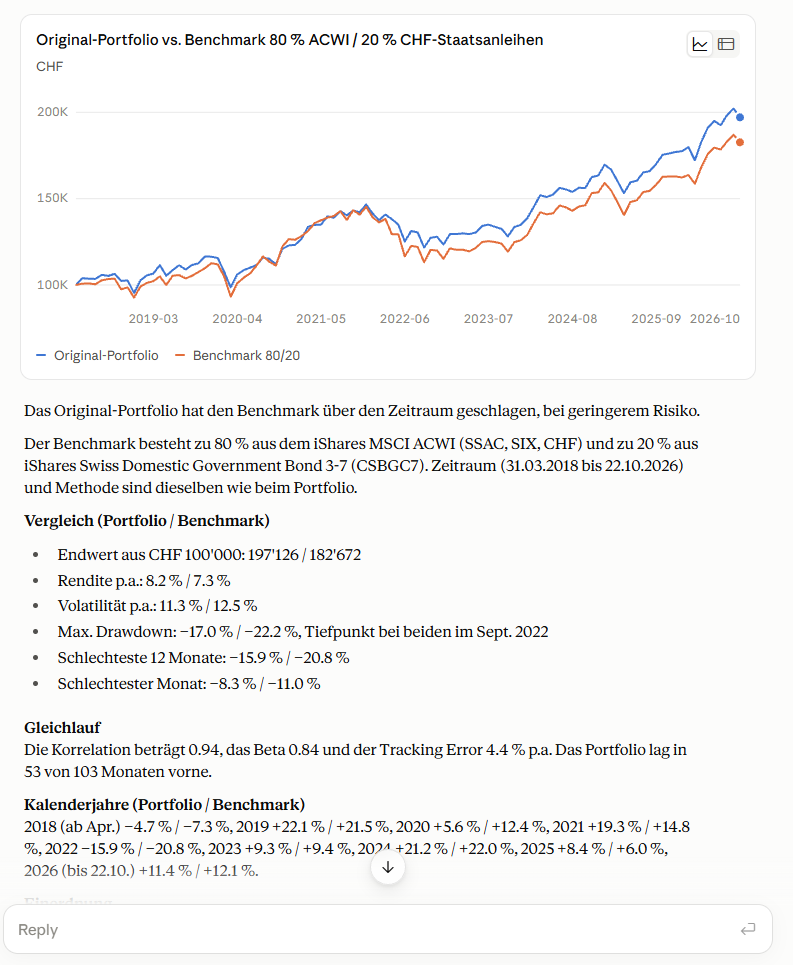
A portfolio compared with an 80% ACWI / 20% CHF government-bond benchmark, with historical performance, volatility, drawdown and other risk metrics explained in the chat.
View full-size screenshot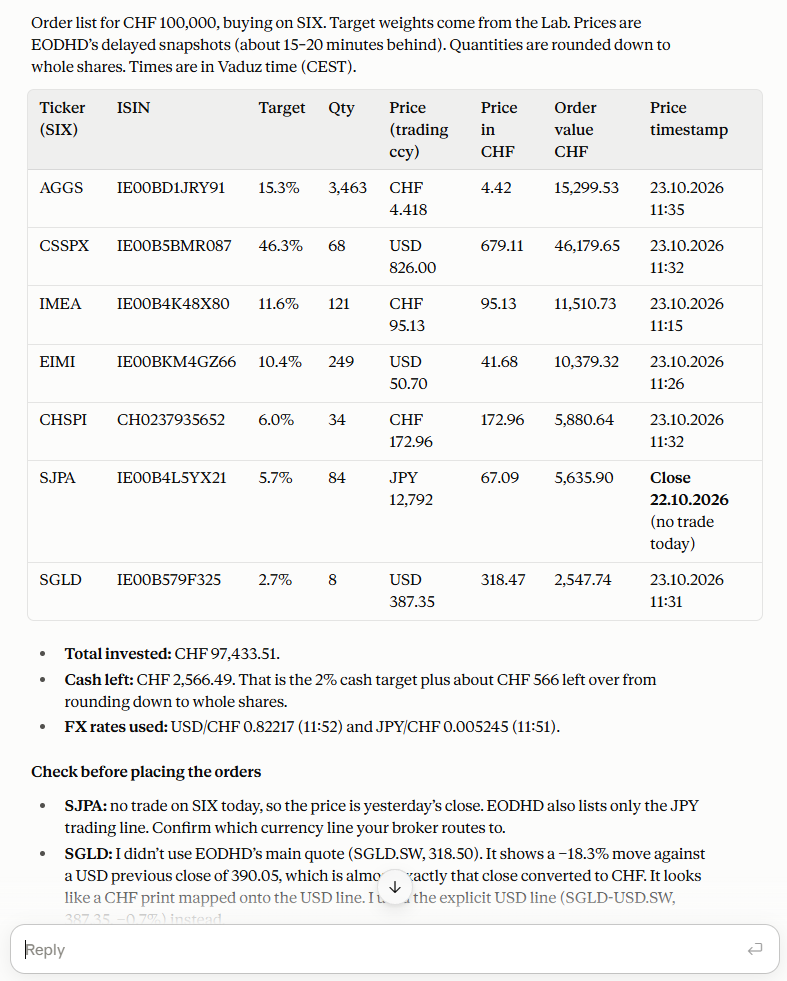
An illustrative CHF 100,000 order list combines target weights from the Lab with delayed external prices, whole-share quantities, remaining cash and checks before placing orders. External data connections are separate from the Lab; this is preparation, not trade execution.
View full-size screenshotIllustrative outputs, not investment advice. Historical performance does not predict future returns.
From analysis to execution – with transparent methodologies, appropriate controls and human oversight.
Important notice: Connections to external market data providers and brokerage platforms are technically possible today through separate MCP servers but are not part of the Investment Decision Lab's functionality.
Can a free, browser-based investment platform deliver capabilities normally associated with professional portfolio construction tools?
This independent review by Claude Cowork takes a deep dive into the BICon Investment Lab, assessing its portfolio analytics, Monte Carlo simulations, ETF portfolio construction framework, AI-assisted workflows, and overall user experience.
The verdict: a uniquely comprehensive platform that combines quantitative portfolio analysis and advanced AI-supported decision-making in a way that is rarely found in a single solution.
Explore the full analysis to discover what sets the BICon Investment Lab apart.
No other publicly available product combines rule-based UCITS ETF portfolio construction, deep quantitative simulation (with fat-tail distributions and crisis correlation regimes), look-through decomposition, currency hedging modeling, WHT optimization, and professional-grade export in a single zero-friction interface.
The prompt engineering in bicon.co is genuinely sophisticated for a free tool. The dynamic constraint injection, mandatory ETF validation guardrails, two-mode design, and structured import round-trip represent a well-thought-out human-AI workflow.
React + TypeScript, Vite, Tailwind CSS and Recharts. Calculations and Excel, PDF and PowerPoint exports run in your browser.
Vercel hosts the app and runs three Node.js/Express functions: admin interface, justETF fund look-ups by ISIN, and EODHD market-data prices.
Supabase PostgreSQL. The app reads via its read-only public API; a shared library validates all writes for the admin console and scheduled jobs.
Scheduled GitHub Actions run Node.js scripts that read justETF’s public fund pages.
pnpm monorepo; Vitest unit tests and Playwright end-to-end tests in a real browser.
Each route has its own access controls. All three lead to the same Postgres database.
End users
Browser
Supabase REST
anon key · RLS
Site admin
/admin
/api/admin/*
Vercel function
Scrapers
GitHub Actions
Node.js scripts
justETF public fund pages
Postgres
One source of truth
Every change to Investment Decision Lab goes through the same quality path before it reaches you.
Design first. New features start as a short written design that is approved before any code is written.
Separate workspace. Each change is developed on its own branch, never directly on the live version.
Automated tests. Thousands of unit, interface and end-to-end tests run during development, and again automatically on every update. A change with a failing test cannot be released.
Independent reviews by two AI systems. Several Claude reviewers (Anthropic), each with its own focus such as correctness, security or language, check every change. OpenAI's Codex then reviews it again as a second, independent reviewer. Every finding is fixed or explicitly answered, and Codex reviews again until it finds nothing more.
Preview before release. Each change can be tried on a protected preview site before it goes live.
Controlled database changes. Changes to the data structure are tested in a dry run first and carried out by the owner personally.
Release by approval only. Nothing goes live without the owner's explicit approval. The live version is protected against direct changes.
Fresh data. The fund catalog is updated continuously, and the built-in reference copy is refreshed every week.
Check after release. After each release an automatic check confirms that the live site works.
The result: Often several releases per day – without compromising on quality controls.
Agentic Software Development does not mean less governance. On the contrary: today we can automate quality processes more rigorously than ever before.
And it is precisely this combination of speed, quality and human accountability that makes the difference.
The Investment Decision Lab is a non-commercial technology showcase — not a product or service. If you want to discuss the methodology, explore the analytical capabilities, or have a professional conversation about portfolio construction, the BICon team is open to dialogue.